Smart home panel guide for control, energy, and installation choices
What a smart home panel should actually solve
A smart home panel is a fixed or portable control interface for lighting, climate, security, media, shades, scenes, and, in some systems, home energy data. It may be a wall-mounted touchscreen, a dedicated controller with buttons, a tablet-style dashboard, or a more advanced electrical and energy management interface. The point is not to add another screen. It is to reduce app switching, give shared spaces a simple control point, and keep everyday functions accessible when voice assistants or phones are inconvenient.
For a home with only a few smart bulbs and plugs, a panel may add little value. In larger homes, rentals, aging-in-place projects, or systems that include HVAC, security, EV charging, solar, batteries, and load management, a well-planned panel can become one of the most useful parts of the installation. The panel should be chosen around the home’s infrastructure and user needs, not the other way around.
For more connected-home context, see the Smart Home section.
Main types of smart home panel
The term “smart home panel” is used for several product categories. Separating them early helps avoid mismatched expectations and expensive rework.
Wall-mounted control touchscreen
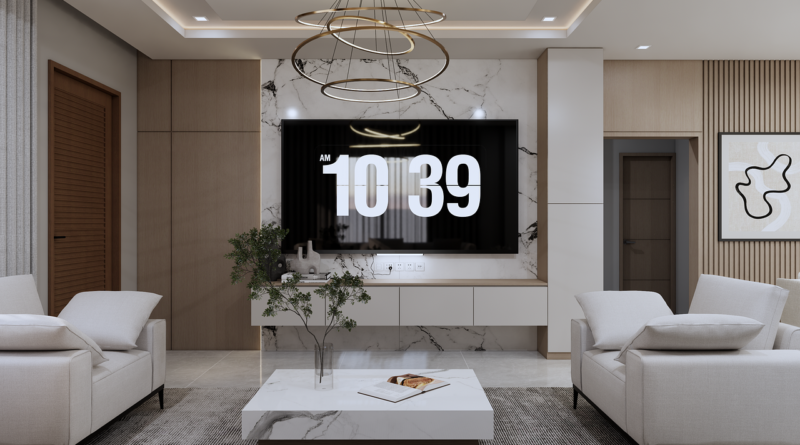
This is the most familiar type. It usually sits near an entry, kitchen, bedroom, or hallway and provides touch access to lighting scenes, thermostat settings, cameras, locks, shades, speakers, and routines. Some models are purpose-built; others are tablets installed in powered wall docks. The benefit is visibility and convenience. The limitation is that the experience depends heavily on the software platform behind the screen.
Keypad or hybrid button panel
A button-based panel is less flashy but often more practical for repeated tasks. A labeled keypad can trigger scenes such as “away,” “movie,” “good night,” or “all off” without asking anyone to navigate a menu. Hybrid panels combine physical controls with a small display, which can work well in high-traffic rooms where speed matters more than deep configuration options.
Energy management panel
An energy-focused panel monitors or controls circuits, solar production, battery status, EV charging, or major loads. This category is closer to electrical infrastructure than a simple dashboard. It may support load shedding during outages, time-of-use scheduling, or visibility into high-consumption appliances. Because these systems can interact with line-voltage equipment, professional installation and code compliance are central requirements.
Hub with dashboard capability
Some households use a smart home hub, mini PC, or local automation controller connected to a wall display. This approach can provide deeper customization and local automations, but it also puts more responsibility on the owner or installer to maintain integrations, backups, and security updates.
The features that matter most
A good panel is not defined by screen size alone. The important features are the ones that keep the system useful after the first week.
- Local control: Basic lighting, scenes, and climate control should continue to work during an internet outage whenever the underlying devices and hub allow it.
- Fast wake and response: A wall panel that takes several seconds to wake up will usually be ignored in favor of a physical switch.
- Role-based access: Children, guests, cleaners, and short-term renters should not need the same permissions as the homeowner.
- Clear room organization: The interface should make common actions easy without burying them under long device lists.
- Multi-ecosystem compatibility: Support for Apple Home, Google Home, Amazon Alexa, SmartThings, Home Assistant, or Matter should be evaluated against the devices already in the home.
- Update policy: A panel mounted into a wall needs a longer support horizon than a phone app. Security patches and platform maintenance matter.
- Fallback controls: Physical switches, thermostats, locks, and safety devices should not become unusable if the panel fails.
For most homes, the practical test is simple: can a person who did not install the system walk up to the panel and complete the five most common tasks in a few seconds?
Interoperability and the Matter timeline
Interoperability is one of the main reasons buyers consider a smart home panel. A panel that works well with only one brand may be acceptable in a small system, but it can become restrictive as the home adds more devices. Matter is relevant because it is designed to reduce fragmentation across major smart home ecosystems. In practice, support still depends on the device category, platform implementation, firmware, and controller being used.
Public announcements from the Connectivity Standards Alliance show how Matter has been expanding beyond simple lighting and plugs. Matter 1.3, released in May 2024, added important energy and water management capabilities and included support for EV charging use cases. Matter 1.4, announced in November 2024, expanded the energy focus with device types such as solar power equipment, batteries, heat pumps, and water heaters. Matter 1.5, announced in late 2025, added cameras, closures, soil sensors, and further energy management improvements. Matter 1.6, announced in 2026, focused less on adding device categories and more on setup, device sharing across ecosystems, and context-aware control.
| Standard milestone | Why it matters for a smart home panel |
|---|---|
| Matter 1.3 | Made energy reporting, EV charging, water management, and more appliance categories more relevant to home dashboards. |
| Matter 1.4 | Expanded the path for panels to display or coordinate solar, batteries, heat pumps, water heaters, and EV charging preferences. |
| Matter 1.5 | Added categories such as cameras and closures, which can make a central panel more useful for access and monitoring. |
| Matter 1.6 | Improved setup and multi-ecosystem experiences, which matters when several platforms share the same household devices. |
The practical takeaway is that “Matter compatible” should be treated as a starting point, not a complete buying decision. A smart home panel may support Matter in one ecosystem but still lack full support for a specific camera feature, energy cluster, lock function, or automation rule. Before choosing a panel, list the devices that must appear on it and confirm support at the feature level.
Energy visibility is becoming a bigger reason to install a panel
Early smart home dashboards focused on convenience: lights, scenes, thermostats, music, and cameras. Energy is now becoming a more serious use case. Households with solar, batteries, heat pumps, smart water heaters, electric vehicles, and time-of-use electricity plans need a clear way to see what is happening and decide what to prioritize.
The U.S. ENERGY STAR Smart Home Energy Management Systems program recognizes systems intended to help households simplify, reduce, and manage energy consumption. That does not mean every smart home panel is an energy management system, and it does not mean a dashboard alone will lower a utility bill. It does show that energy coordination is now part of the connected-home discussion, not only a feature for commercial buildings.
A useful energy panel should answer practical questions. Is the EV charging now or waiting for a cheaper period? Is the battery discharging during peak pricing? Which major loads are running during an outage? Is the heat pump being managed for comfort, cost, or grid demand? If the panel cannot turn energy data into understandable actions, it may become another graph that nobody checks.
For homes without solar or EV charging, simpler energy features may still be useful. Smart thermostats, lighting schedules, occupancy-based scenes, and appliance alerts can help reduce waste. Buyers should still be cautious about broad savings claims. Energy outcomes depend on local rates, weather, equipment efficiency, household behavior, and whether automations are actually left enabled.
Installation, safety, and wiring considerations
Installation is where many smart home panel projects become more complicated than expected. A tablet on a counter is simple. A recessed wall touchscreen with constant power, network access, and integration with locks, thermostats, cameras, or electrical circuits requires more planning. See also: Gadgets.
For low-voltage or Power over Ethernet designs, the panel may use a single cable for data and power. IEEE 802.3bt expanded standardized PoE capability over four wire pairs, which helps support higher-power network devices. Still, PoE does not remove the need for proper cabling, rated power sourcing equipment, and installation practices suitable for the building. In-wall wiring should follow applicable electrical codes and local requirements.
Line-voltage controls, circuit-level energy systems, and load management panels require particular caution. In the United States, the National Electrical Code is commonly adopted by states and local jurisdictions with amendments. Product safety listings may also matter. Depending on the design, relevant safety frameworks can include standards for audio/video and information technology equipment, automatic electrical controls, or electrical control assemblies. The exact requirement depends on the product and installation, so homeowners should rely on licensed professionals rather than generic online instructions.
Placement also affects usability. A panel near the main entry is convenient for away scenes and security status. A kitchen panel can support family routines, music, timers, and climate control. Bedroom panels should be simple, dimmable, and not distracting at night. Avoid placing a glossy screen where sunlight makes it unreadable or where guests may confuse it with a code-required control.
Security and privacy should be part of the buying decision
A smart home panel often has access to cameras, locks, occupancy, schedules, security modes, and energy behavior. That makes cybersecurity more than a technical detail. In the United States, the FCC established the voluntary U.S. Cyber Trust Mark program for wireless consumer IoT products, building on criteria developed with NIST. The program is intended to help consumers identify connected devices that meet cybersecurity requirements, although it does not replace careful configuration by the owner.
For a smart home panel, the security checklist should include automatic software updates, a clear support period, strong account protection, local permission controls, encrypted communication where supported, and the ability to remove access for former users. If the panel has a camera or microphone, buyers should also check whether those sensors can be disabled and how captured data is handled.
Privacy is also an interface issue. A hallway dashboard should not expose live camera feeds, unlock buttons, or alarm controls to every visitor. Better panels let homeowners create limited views, require a code for sensitive actions, and separate routine controls from security-critical controls.
How to choose the right smart home panel
Start with the household’s daily routines instead of product specifications. A practical selection process looks like this:
- List the must-control systems: lighting, HVAC, locks, cameras, shades, music, garage doors, irrigation, EV charging, solar, or battery storage.
- Identify the primary ecosystem: choose the panel that works best with the platform already managing most devices.
- Decide between touch, buttons, or both: touchscreens are flexible, but buttons are faster for repeated actions.
- Check local control needs: if internet outages are common, avoid designs that depend entirely on cloud access.
- Confirm feature-level compatibility: do not rely only on brand logos or broad compatibility claims.
- Plan power and network before buying: decide whether the panel will use PoE, low-voltage power, an outlet, battery, or hardwired installation.
- Review update and security policies: a wall panel should not become unsupported long before the renovation ages.
The right panel should make the home feel simpler. If the setup requires constant maintenance, creates duplicate controls, or hides basic actions behind complex menus, it is not solving the main problem.
Frequently asked questions
Is a smart home panel better than using a phone app?
It depends on the household. A phone app is personal and portable, while a panel is shared and fixed. A panel is often better for common areas, guests, children, and quick scenes. A phone is still better for remote control, notifications, and detailed settings.
Does a smart home panel need Matter support?
Matter support is helpful, especially for mixed-brand homes, but it is not the only requirement. Buyers should confirm that the exact devices and functions they need are supported by the panel, hub, and ecosystem they plan to use.
Can a tablet be used as a smart home panel?
Yes, many homes use a tablet in a wall mount or charging dock. This can be cost-effective and flexible. The trade-offs include battery aging, app reliability, screen wake behavior, mounting aesthetics, and long-term operating system support.
Should a smart home panel control locks and security systems?
It can, but access should be restricted. Sensitive actions such as unlocking doors, changing alarm modes, or viewing cameras should require authentication or be hidden from guest views.
Is professional installation necessary?
Professional installation is strongly recommended when the panel is recessed, hardwired, connected to line-voltage controls, or integrated with load management, solar, batteries, or EV charging. Simple tabletop or plug-in dashboards may be suitable for do-it-yourself setup.
Bottom line
A smart home panel is most valuable when it becomes the home’s shared, reliable control point rather than another screen competing for attention. For simple systems, it may be optional. For homes with many devices, multiple users, energy management, or mixed ecosystems, it can improve usability and make automation easier to understand.
The strongest choices combine clear interface design, verified device compatibility, sensible security controls, dependable power and networking, and a realistic update path. As Matter, energy management, and consumer IoT security programs continue to mature, smart home panels are likely to shift from convenience dashboards toward more important household infrastructure.