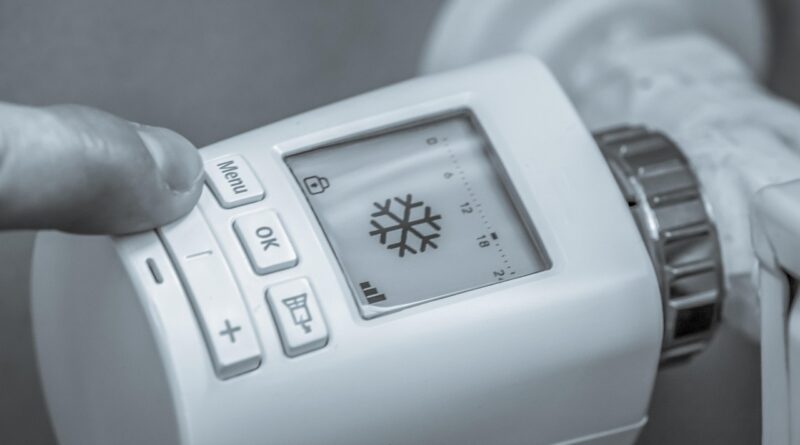
Honeywell Home T5 Smart Thermostat guide for features, compatibility and setup
Quick answer
The Honeywell Home T5 Smart Thermostat is a Wi-Fi connected, ENERGY STAR certified thermostat for homeowners who want app control, location-based scheduling and voice assistant support without stepping up to a premium smart thermostat. It is best suited to forced-air heating and cooling, heat pump, or conventional HVAC systems that can provide 24 VAC power through a C wire or a compatible C-wire adapter.
It is not a fit for electric baseboard heat, millivolt systems, or installations that need wired indoor or outdoor sensor terminals. In practical terms, the T5 is a sensible choice for reliable scheduling, geofencing and remote control. It is less compelling if you need room-by-room temperature sensing, Matter-first local control, or advanced ventilation control.
What the Honeywell Home T5 is designed to do
The Honeywell Home T5 Smart Thermostat sits in the middle of the smart thermostat market. It is more capable than a basic programmable thermostat because it connects to Wi-Fi, works with a mobile app and can respond to location-based routines. At the same time, it is not designed to serve as a full smart home display or a room-sensing control hub.
Honeywell Home and Resideo product materials describe the T5 as a programmable smart thermostat with a touchscreen display, 2.4 GHz Wi-Fi connectivity, 7-day scheduling options and smart response behavior. ENERGY STAR product information lists T5 Wi-Fi Thermostat model families such as RCHT8610WF and related model numbers as certified connected thermostats for the U.S. and Canada.
For readers comparing connected climate controls within a broader smart home upgrade, the key point is simple: the T5 is built around comfort automation rather than novelty. Its strongest use cases are remote temperature changes, schedule automation, geofencing and utility rebate eligibility where available.
Key features and how they affect daily use
The T5’s feature list is straightforward, but each function has a practical impact. The thermostat is not useful simply because it has an app. It is useful when the app, schedule and HVAC behavior match how the household actually uses the space.
| Feature | What it does | Why it matters |
|---|---|---|
| Geofencing | Uses a smartphone location boundary to help switch between home and away comfort settings. | Useful for households with changing schedules that do not want a rigid daily program. |
| 7-day scheduling | Allows different time-based settings by day or period. | Useful for predictable routines, such as weekday work hours and weekend mornings. |
| Smart response | Learns how long the HVAC system typically takes to reach a set temperature. | Helps the home reach the target temperature closer to the scheduled time. |
| Remote app control | Lets users adjust temperature and settings from a phone or tablet. | Helpful for travel, unexpected schedule changes and checking comfort away from home. |
| Alerts and reminders | Can provide filter reminders and temperature-related notifications depending on setup. | Supports basic maintenance habits and helps users notice unusual indoor temperature changes. |
| Voice assistant support | Official materials list support for platforms such as Amazon Alexa, Apple HomeKit and Google Assistant. | Useful if temperature control is part of a larger voice-controlled home setup. |
The main operating choice is whether to use geofencing, a fixed schedule, or both. A fixed schedule is usually cleaner for households with stable routines. Geofencing can work better for irregular work hours, but it depends on each occupant carrying a configured phone and allowing location permissions. If those permissions are disabled, the feature may not behave as expected.
Compatibility checks before buying
Compatibility is the part that deserves the most attention before purchase. The Honeywell Home T5 Smart Thermostat requires 24 VAC power, commonly supplied through a C wire. Some T5+ packages include a C-wire power adapter, while documentation notes that T5 packages without the plus designation may not include that adapter in the box. Buyers should verify the exact package and model before assuming the adapter is included.
Wiring and HVAC system type
Official installation documentation says the T5 is compatible with most heating, cooling and heat pump systems, but it also lists important exclusions. It does not work with 120-240V electric baseboard heat, millivolt systems, S terminals for indoor or outdoor sensors, or U terminals used for ventilation relay control. That makes the T5 a poor match for some older systems, specialized heating equipment and homes that rely on accessory ventilation wiring.
Honeywell Home product specifications also list support for multi-stage configurations on some T5/T5+ variants, including up to 3 heat/2 cool heat pump systems and up to 2 heat/2 cool conventional systems. However, that does not mean every home with those labels is automatically compatible. The safer approach is to compare the existing thermostat wiring, the HVAC equipment manual and the exact T5 model documentation.
Wi-Fi and app requirements
The T5 operates on 2.4 GHz Wi-Fi. This matters because many modern routers broadcast both 2.4 GHz and 5 GHz networks. If the thermostat cannot find the home network during setup, one common cause is that the phone is connected to a 5 GHz network while the thermostat needs a 2.4 GHz SSID. A separated network name, temporary router setting change or guided setup through the app may be needed.
Users should also expect the thermostat’s smart features to depend on account setup, app access and cloud services. The wall control can still manage temperature locally, but remote control, notifications, energy reports and ecosystem integrations depend on software and connectivity.
Energy savings and rebate expectations
The T5’s energy case rests on scheduling discipline, geofencing and ENERGY STAR certification, not on a promise that every household will see the same bill reduction. ENERGY STAR states that certified smart thermostats are independently certified using field data and that average savings are about 8 percent of heating and cooling costs, or roughly $50 per year. That figure is an average, not a guarantee.
Actual savings depend on climate, insulation, HVAC efficiency, household schedules, comfort preferences and previous thermostat behavior. A household that already used an efficient programmable schedule may see modest savings. A household that often heated or cooled an empty home may get more value from geofencing and away settings.
Utility rebates can also change the purchase calculation. Honeywell Home materials encourage buyers to check energy provider programs, and many utilities periodically offer rebates for ENERGY STAR certified smart thermostats. These programs are location-specific and may require purchase through a utility marketplace, proof of model eligibility, or enrollment in a demand response program. Before buying, check the current rules from your local utility rather than assuming a rebate will apply automatically. See also: Gadgets.
Where the T5 fits against newer or premium thermostats
The T5 remains relevant because it covers the core functions many homeowners actually use: app control, schedules, geofencing, voice assistant compatibility and ENERGY STAR certification. It is not intended to compete with premium thermostats that emphasize remote room sensors, advanced occupancy detection, air quality features, large displays, or deeper smart home hub functionality.
Choose the T5 if your home has compatible wiring, you want a relatively simple smart thermostat, and your comfort issue is mainly about controlling temperature when you are home, away or asleep. It is especially practical for users who prefer a familiar thermostat interface and do not want a device that requires constant adjustment.
Consider a different model if you need temperature balancing across several rooms, built-in sensor networks, direct Matter support as a primary requirement, or control over accessories such as whole-home ventilation. Premium alternatives may also make more sense in larger homes where a hallway thermostat does not represent bedroom, nursery or office comfort very well.
Setup checklist for a smoother installation
Installation should start with documentation, not tools. Turn off power to the HVAC system at the breaker or service switch before removing the old thermostat. Take a clear photo of the old wiring before disconnecting anything, including terminal letters. Do not count jumper wires as separate functional wires, because the T5 documentation notes that jumpers are not needed in the same way on the new thermostat.
- Confirm that the existing system is low-voltage 24 VAC, not line-voltage electric baseboard heat.
- Look for a wire connected to the C terminal. If none is present, check whether an unused conductor is tucked into the wall or whether your package includes a C-wire power adapter.
- Confirm that your old thermostat does not rely on unsupported S or U terminals.
- Prepare the 2.4 GHz Wi-Fi network name and password before beginning app setup.
- Decide whether the household will use time-based scheduling, geofencing, or both.
- After installation, test heating, cooling and fan operation before relying on automation.
If there is uncertainty about terminals, heat pump reversing valve settings, zone panels or unused wires at the equipment board, hiring an HVAC professional is a sensible precaution. Incorrect thermostat wiring can cause improper operation and may damage equipment.
Practical verdict
The Honeywell Home T5 Smart Thermostat is a practical midrange smart thermostat for homeowners who want useful automation without overcomplicating the HVAC control point. Its best features are geofencing, schedule flexibility, remote app control, voice assistant compatibility and ENERGY STAR certification. Its main limitations are also clear: it needs proper low-voltage power, does not support some specialty terminals, is limited to 2.4 GHz Wi-Fi and lacks the advanced room-sensing features found in some premium models.
For a compatible home, the T5 can be a good upgrade from a manual or older programmable thermostat. For homes with unusual wiring, electric baseboard heat, millivolt equipment or strong room-by-room comfort needs, the better move is to check compatibility carefully and compare alternatives before purchasing.
Frequently asked questions
Does the Honeywell Home T5 Smart Thermostat need a C wire?
Yes. The T5 requires 24 VAC power, commonly supplied through a C wire. Some T5+ packages include a C-wire power adapter, but buyers should confirm the exact package contents before purchase.
Does the T5 work with Apple HomeKit?
Honeywell Home and Resideo documentation state that the T5 supports Apple HomeKit. Current product materials also list compatibility with Amazon Alexa and Google Assistant, though setup requirements can vary by app version and account configuration.
Can the T5 control electric baseboard heating?
No. The T5 is not designed for 120-240V electric baseboard heat. Homes with line-voltage heating need a thermostat specifically rated for that system type.
Will the T5 lower my energy bill?
It can help reduce wasted heating and cooling when schedules, geofencing and away settings are used well. ENERGY STAR cites average savings for certified smart thermostats, but actual results depend on climate, equipment, home insulation and previous thermostat habits.
What is the difference between T5 and T5+?
The most practical difference is packaging. T5+ documentation indicates that a C-wire power adapter may be included, while T5 models without the plus marking may not include it. Always check the exact model and package description before buying.